












How to use GPT-4 Turbo for Free in Microsoft Copilot? Now Free for All


 Follow
What many people do not know about Microsoft Copilot is that it is not just a standalone feature. Rather, Coiplot is a set of AI features & tools that users can use in several Microsoft products including PowerPoint, Word, Excel, etc. The good news is now you can use GPT-4 Turbo for free in Microsoft Copilot (earlier it was only available for paid users). GPT 4-Turbo is a more improved version of GPT-4 and we will help you spot the difference.
Read below how to use Copilot (free) with GPT 4 Turbo and a quick comparison of GPT-4 vs GPT-4 Turbo.
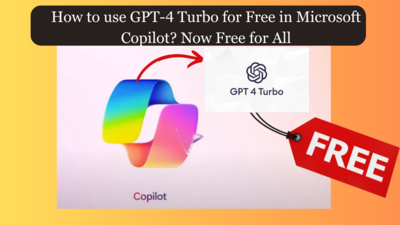
Microsoft Copilot or Microsoft 365 Copilot is simply integrated AI that combines the power of large language models (LLMs) with your data in the Microsoft Graph and the Microsoft 365 apps. Microsoft Copilot has both paid and free plans available. The paid plan starts at $20 per month (₹2000 approx). A few of the apps where copilot is supported include Word, Powerpoint, Excel, Outlook, Teams & Loop. Users can use Copilot in their Chrome or Edge browser as well as the Copilot app and within in Microsoft 365 apps.
GPT-4 Turbo in Microsoft Copilot is Open-AI’s latest model. Its more capable & has more updated knowledge of cutoff of April 2023. The upgraded feature from GPT-4 to GPT-4 Turbo was only available for Copilot paid users until recently when Microsoft has made the GPT-4 Turbo service for free in Microsoft 365 Copilot.
To use GPT-4 Turbo for free in Microsoft Copilot, users need to follow the below steps:
Visit Microsoft Copilot in your browser
OR
Download the app from the Play Store or App Store
Scroll down to find the “conversation style” option
You will find three options here: Creative, Balanced & Precise
To use GPT-4 Turbo in Copilot, simply select either Creative or Precise
That’s all. You can now use the Copilot free version with GPT-4 Turbo
If you love such money-saving deals as we do, you might want to check out our Loot Deals Group & Freebies Deals Group.
To use GPT-4 Turbo in Copilot for free, users need not download anything extra or tweak any complex settings. Simply changing the conversation style can help you use GPT-4 Turbo for free.
Copilot also allows users to create free AI images powered by Dall-E-3. Note that only signed-in users with a Microsoft account can create and view these AI images.
A simple comparison between GPT vs GPT-4 Turbo gives us a clear idea of why the latest GPT-4 Turbo being free in Microsoft Copilot is a big deal.
To compare GPT 4 vs GPT-4 Turbo, we gave the same prompt to both models.
The prompt we used was:
“A train leaves the station with 60 passengers. Yesterday, the train had 30 passengers out of which 10 got off. How many passengers does the train have?”
The correct answer here is 60 since the train’s yesterday’s passengers don’t affect the number of passengers on the train today.
Here’s how GPT 4 answered the prompt vs GPT-4 Turbo:
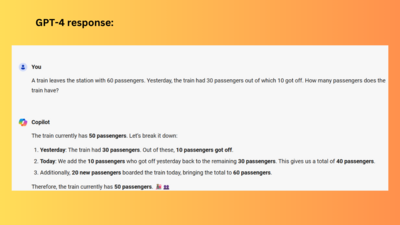
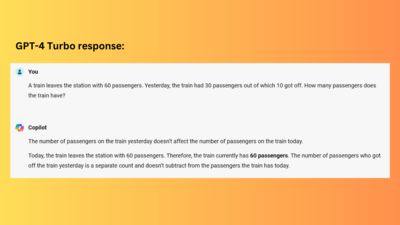
As you can see the answer that GPT-4 gave was 50 which is of course not correct. While GPT-4 Turbo gave us the right answer of 60 passengers.
So, this was all about sharing how you can use GPT-4 Turbo for free in Microsoft Copilot and a simple comparison between GPT-4 vs GPT-4 Turbo.
Earlier last month, Google also made its Gemini AI (paid) for free for 2 months. Get its details here:







if the app doesn't work, try in the browser through this link
Copilot (microsoft.com)
What many people do not know about Microsoft Copilot is that it is not just a standalone feature. Rather, Coiplot is a set of AI features & tools that users can use in several Microsoft products including PowerPoint, Word, Excel, etc. The good news is now you can use GPT-4 Turbo for free in Microsoft Copilot (earlier it was only available for paid users). GPT 4-Turbo is a more improved version of GPT-4 and we will help you spot the difference.
Read below how to use Copilot (free) with GPT 4 Turbo and a quick comparison of GPT-4 vs GPT-4 Turbo.
Microsoft Copilot or Microsoft 365 Copilot is simply integrated AI that combines the power of large language models (LLMs) with your data in the Microsoft Graph and the Microsoft 365 apps. Microsoft Copilot has both paid and free plans available. The paid plan starts at $20 per month (₹2000 approx). A few of the apps where copilot is supported include Word, Powerpoint, Excel, Outlook, Teams & Loop. Users can use Copilot in their Chrome or Edge browser as well as the Copilot app and within in Microsoft 365 apps.
GPT-4 Turbo in Microsoft Copilot is Open-AI’s latest model. Its more capable & has more updated knowledge of cutoff of April 2023. The upgraded feature from GPT-4 to GPT-4 Turbo was only available for Copilot paid users until recently when Microsoft has made the GPT-4 Turbo service for free in Microsoft 365 Copilot.
To use GPT-4 Turbo for free in Microsoft Copilot, users need to follow the below steps:
Visit Microsoft Copilot in your browser
OR
Download the app from the Play Store or App Store
Scroll down to find the “conversation style” option
You will find three options here: Creative, Balanced & Precise
To use GPT-4 Turbo in Copilot, simply select either Creative or Precise
That’s all. You can now use the Copilot free version with GPT-4 Turbo
To use GPT-4 Turbo in Copilot for free, users need not download anything extra or tweak any complex settings. Simply changing the conversation style can help you use GPT-4 Turbo for free.
Copilot also allows users to create free AI images powered by Dall-E-3. Note that only signed-in users with a Microsoft account can create and view these AI images.
A simple comparison between GPT vs GPT-4 Turbo gives us a clear idea of why the latest GPT-4 Turbo being free in Microsoft Copilot is a big deal.
To compare GPT 4 vs GPT-4 Turbo, we gave the same prompt to both models.
The prompt we used was:
The correct answer here is 60 since the train’s yesterday’s passengers don’t affect the number of passengers on the train today.
Here’s how GPT 4 answered the prompt vs GPT-4 Turbo:
As you can see the answer that GPT-4 gave was 50 which is of course not correct. While GPT-4 Turbo gave us the right answer of 60 passengers.
So, this was all about sharing how you can use GPT-4 Turbo for free in Microsoft Copilot and a simple comparison between GPT-4 vs GPT-4 Turbo.
Earlier last month, Google also made its Gemini AI (paid) for free for 2 months. Get its details here: