












Jio AX6000 Wifi-6 Router Price, Benefits & Installation, Buy or Not?


 Follow
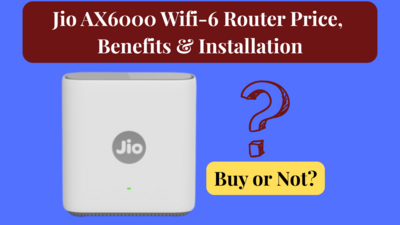
Reliance Jio AX6000 Wi-Fi 6 router recently launched in India at a price of Rs.5999. The new Jio AX6000 is creating a lot of buzz for its high-speed up to 6000 Mbps, compact design, dual-band Wi-Fi and a Wi-Fi 6 support. But hold your horses before you buy the Jio AX6000 online. In this article we are sharing everything you need to know about the Jio AX6000 router, price, benefits & features, installation process and importantly, is the Jio AX6000 good? Should you buy a Jio AX6000 router or not? Let’s get to it.
.
The Jio AX600 is a new Wi-Fi 6 universal router that works with all ISPs as long as the internet connection from your ISP is DHCP-based and not IPoE or PPPoE-based. It offers high-speed internet up to 6000 Mbps, covers 2000 sq ft, dual-band support, can connect up to 100 devices and offers 4 Gigabit LAN ports.
What is the difference between DHCP and IPoE or PPPoE?💡
The main difference between DHCP (Dynamic Host Configuration Protocol) vs IPoE (IP over Ethernet) or PPPoE (Point-to-Point Protocol over Ethernet) is that DHCP is “plug and play” — when you connect the router to the ISP line (via Ethernet), the router automatically gets an IP address and connects to the internet — no username/password required.
Whereas, PPoE connections require a username & password to be entered inside the router to authenticate. ISPs like BSNL, MTNL, and older local cable operators still sometimes use this.
This difference is very important to know if you are planning to buy a Jio AX6000 Wi-Fi 6 router. Keep in mind, it only works on a DHCP-based connection.
.
Jio AX6000 price is Rs.5999, a 60% discounted price compared to its MRP of Rs.14,999. While there are no discounts on the Jio AX6000 router, customers can use credit card offers to make savings.
.
The Jio AX6000 Wi-Fi 6 router is available to buy on Amazon India, Reliance Digital and JioMart. The price of the Jio AX6000 router is Rs.5999.
Also read: Amazon Tips & Hacks to Find Loot Deals
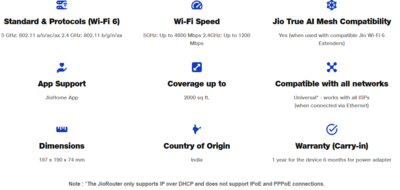
Following are the features or benefits of Jio AX6000 router:
Feature |
Details |
Speed |
Supports max up to 6000 Mbps (4800 Mbps in 5 GHz and 1200 Mbps in 2.4 GHz). |
Coverage |
Covers up to 2000 sq. ft with powerful hidden antennas |
Universal Compatibility |
Works with all ISPs* (DHCP-based connections only) |
Wi-Fi Standard |
Wi-Fi 6 (latest generation) for faster speeds and better efficiency |
Simultaneous Devices |
Supports 100+ connected devices with OFDMA & MU-MIMO |
Mesh Ready |
Jio True AI Mesh ready — can pair with other mesh nodes for seamless whole-home coverage |
Security |
WPA3 Advanced Security for enhanced protection |
Gaming & Streaming |
Lag-free gaming and buffer-free 8K streaming |
LAN Ports |
4x Gigabit LAN ports for fast wired connections (ideal for gaming consoles, PCs, TVs) |
Chipset |
Quad-Core chipset for smooth performance and multitasking |
App Control |
JioHome App for setup, parental controls, guest network, device management |
Antenna Design |
Sleek design with hidden powerful antennas |
Connection Type Support |
Only supports IP over DHCP; does not support IPoE or PPPoE connections |
Price |
Rs.5999 |
.
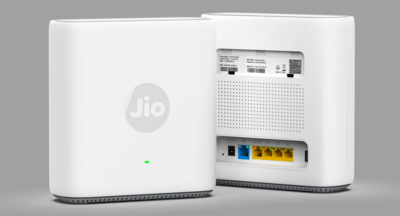
You plug the Jio AX6000 into your existing internet connection (via Ethernet cable).
Ensure you’ve a DHCP-based internet connection from your ISP.
It takes the internet from your ISP and broadcasts fast Wi-Fi 6 signals across your home.
You can also use LAN ports for faster wired devices like gaming consoles or PCs.
Manage your network with the JioHome app (set passwords, add guest networks, monitor usage).
Add more mesh extenders such as Jio Wi-Fi Mesh (if needed) for more coverage (beyond 2000 sq. ft)
.
.
Is the Jio AX600 good? Yes. Is it better than other Wi-Fi routers in the same price range? Yes, mostly. Is it worth buying? Perhaps.
Reliance Jio’s new router AX600 is making names for itself for its Wi-Fi 6 and high-speed capabilities. But there are a few important things you must know before buying the Jio AX6000 router.
Starting with the basics first, the Jio AX6000 has a sleek design (no antennas hanging around). It also gets multiple LAN ports which is always a good thing to have. The fact that it is a universal router also means you can connect any ISP to it including Airtel Xstream Fiber, JioFiber, etc. Being compatible with mesh networks is a cherry on top too. One of its biggest advantages is that Jio claims it supports up to 6000 Mbps speed - something not many Wi-Fi routers offers at this price
But the two most important cons I feel about the Jio AX6000 router is that it is only compatible with DHCP-based connections. Most TP-Link, Tenda Routers, Asus routers, Google Nest Wi-Fi routers and other major wireless router brands are compatible with different connection types including both DHCP & PPPoE (so you can easily switch between the connections as per your needs).
The next con is the lack of independent firmware testing. Jio is a giant player when it comes to telecom. But when it comes to launching consumer electronics such as the JioBook Laptop & Jio-Fi, the company has not done that great. Even Jio AirFiber’s occasional stability issues are often reported by users. While other players offer 3-years warranty on routers priced less than Jio’s, the Jio AX6000 router warranty is only 1-year.
Also, the Jio AX6000 does not support OpenVPN or PPTP like the TP-Link AX1800 at Rs.3699 does (in case that is important to you).
With that said, the Jio AX6000 on paper does seem to be a great value for money. What’s your views on the Jio AX6000 router? Is the Jio AX6000 good or bad? Do share in the comments below. Hope you found this article useful.
Also read: Upcoming Monsoon Offers in India 2025
FAQs
1. What is the Jio AX6000 router?
It’s a universal Wi-Fi 6 router from Jio that works with all ISPs and delivers superfast, reliable Wi-Fi across your home.
2. How can I know if my connection is DHCP or PPPoE?
Ask your ISP, they will tell you. If you didn’t enter any login details during setup, you likely have DHCP. Alternatively, if you own a TP-Link router, log in to the admin page (usually 192.168.0.1 or 192.168.1.1 in browser) check under Internet Settings or WAN settings.
3. Does the Jio AX6000 router work with Airtel Fiber or JioFiber?
Yes, Jio AX6000 is a universal router. Thus, it’s compatible with all ISPs.*
4. Does the Jio AX6000 router work as a modem + router combo?
No, it is only a router. If your ISP requires a modem (like BSNL DSL), you still need to use their modem.
5. How much does Jio AX6000 cost?
The new Jio Wi-Fi 6 router is priced at Rs.5999.
6. Can I replace my old TP-Link / D-Link / Tenda router with Jio AX6000?
Yes, if your ISP gives a DHCP connection (plug-and-play Ethernet). If your old router was set up with username/password (PPPoE), this will not replace it directly.
7. Will I need to configure anything to use this router?
If your ISP uses DHCP, no complex setup needed – just plug in and use via the JioHome app







just buy old router make it extender by using dd-wrt or open-wrt and you are ready to go. Jio made its stock routers single band and pushing this.
We are getting all this for free with jok Airfiber installation.
Reliance Jio AX6000 Wi-Fi 6 router recently launched in India at a price of Rs.5999. The new Jio AX6000 is creating a lot of buzz for its high-speed up to 6000 Mbps, compact design, dual-band Wi-Fi and a Wi-Fi 6 support. But hold your horses before you buy the Jio AX6000 online. In this article we are sharing everything you need to know about the Jio AX6000 router, price, benefits & features, installation process and importantly, is the Jio AX6000 good? Should you buy a Jio AX6000 router or not? Let’s get to it.
.
The Jio AX600 is a new Wi-Fi 6 universal router that works with all ISPs as long as the internet connection from your ISP is DHCP-based and not IPoE or PPPoE-based. It offers high-speed internet up to 6000 Mbps, covers 2000 sq ft, dual-band support, can connect up to 100 devices and offers 4 Gigabit LAN ports.
This difference is very important to know if you are planning to buy a Jio AX6000 Wi-Fi 6 router. Keep in mind, it only works on a DHCP-based connection.
.
Jio AX6000 price is Rs.5999, a 60% discounted price compared to its MRP of Rs.14,999. While there are no discounts on the Jio AX6000 router, customers can use credit card offers to make savings.
.
The Jio AX6000 Wi-Fi 6 router is available to buy on Amazon India, Reliance Digital and JioMart. The price of the Jio AX6000 router is Rs.5999.
Also read: Amazon Tips & Hacks to Find Loot Deals
Following are the features or benefits of Jio AX6000 router:
Feature
Details
Speed
Supports max up to 6000 Mbps (4800 Mbps in 5 GHz and 1200 Mbps in 2.4 GHz).
Coverage
Covers up to 2000 sq. ft with powerful hidden antennas
Universal Compatibility
Works with all ISPs* (DHCP-based connections only)
Wi-Fi Standard
Wi-Fi 6 (latest generation) for faster speeds and better efficiency
Simultaneous Devices
Supports 100+ connected devices with OFDMA & MU-MIMO
Mesh Ready
Jio True AI Mesh ready — can pair with other mesh nodes for seamless whole-home coverage
Security
WPA3 Advanced Security for enhanced protection
Gaming & Streaming
Lag-free gaming and buffer-free 8K streaming
LAN Ports
4x Gigabit LAN ports for fast wired connections (ideal for gaming consoles, PCs, TVs)
Chipset
Quad-Core chipset for smooth performance and multitasking
App Control
JioHome App for setup, parental controls, guest network, device management
Antenna Design
Sleek design with hidden powerful antennas
Connection Type Support
Only supports IP over DHCP; does not support IPoE or PPPoE connections
Price
Rs.5999
.
You plug the Jio AX6000 into your existing internet connection (via Ethernet cable).
Ensure you’ve a DHCP-based internet connection from your ISP.
It takes the internet from your ISP and broadcasts fast Wi-Fi 6 signals across your home.
You can also use LAN ports for faster wired devices like gaming consoles or PCs.
Manage your network with the JioHome app (set passwords, add guest networks, monitor usage).
Add more mesh extenders such as Jio Wi-Fi Mesh (if needed) for more coverage (beyond 2000 sq. ft)
.
.
Is the Jio AX600 good? Yes. Is it better than other Wi-Fi routers in the same price range? Yes, mostly. Is it worth buying? Perhaps.
Reliance Jio’s new router AX600 is making names for itself for its Wi-Fi 6 and high-speed capabilities. But there are a few important things you must know before buying the Jio AX6000 router.
Starting with the basics first, the Jio AX6000 has a sleek design (no antennas hanging around). It also gets multiple LAN ports which is always a good thing to have. The fact that it is a universal router also means you can connect any ISP to it including Airtel Xstream Fiber, JioFiber, etc. Being compatible with mesh networks is a cherry on top too. One of its biggest advantages is that Jio claims it supports up to 6000 Mbps speed - something not many Wi-Fi routers offers at this price
But the two most important cons I feel about the Jio AX6000 router is that it is only compatible with DHCP-based connections. Most TP-Link, Tenda Routers, Asus routers, Google Nest Wi-Fi routers and other major wireless router brands are compatible with different connection types including both DHCP & PPPoE (so you can easily switch between the connections as per your needs).
The next con is the lack of independent firmware testing. Jio is a giant player when it comes to telecom. But when it comes to launching consumer electronics such as the JioBook Laptop & Jio-Fi, the company has not done that great. Even Jio AirFiber’s occasional stability issues are often reported by users. While other players offer 3-years warranty on routers priced less than Jio’s, the Jio AX6000 router warranty is only 1-year.
Also, the Jio AX6000 does not support OpenVPN or PPTP like the TP-Link AX1800 at Rs.3699 does (in case that is important to you).
With that said, the Jio AX6000 on paper does seem to be a great value for money. What’s your views on the Jio AX6000 router? Is the Jio AX6000 good or bad? Do share in the comments below. Hope you found this article useful.
Also read: Upcoming Monsoon Offers in India 2025