












Whatsapp Dual Account on Same Device Feature Launched


 Follow
Whatsapp has launched a new feature where you can use 2 accounts on the same device without logging-out and logging back in. It is called ‘Whatsapp Dual Accounts’. Earlier, the company came up with using the same Whatsapp account on multiple devices. Also, Whatsapp recently got the Passkey feature for Android so helped users login without the hassles of OTP authentication every time.
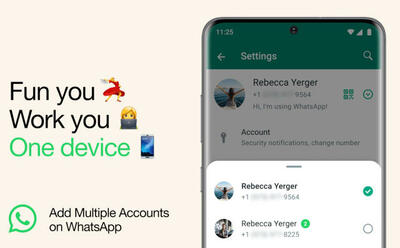
With Whatsapp Dual Accounts, you can use 2 profiles at the same time on the same device. The company says that one is meant for your personal use and the other one for work related so that you are focused & relaxed both at the same time.
You simply need to switch between personal and work profiles to get started. Both accounts will have a different registered mobile number so you will need to have a dual-sim phone for it to work.
Update Whatsapp
Go to ‘Settings’
Enter into ‘Account’
Select ‘Add Account’ (you can also access it via down-arrow button next to your name)
Enter the 2nd mobile number and verify via OTP.
Done! You can switch between accounts by clicking on the down arrow button (beside your name and QR).
This new feature will eliminate the need of carrying 2 devices. Also, it will ease up the usage so you don’t mix-up personal and work-related chats.
Mark Zuckerberg announced Whatsapp Dual Accounts feature by saying:-
Switch between two accounts on WhatsApp -- Soon you'll be able to have two WhatsApp accounts on one phone within the app.
Both accounts will have different privacy, notifications, and other settings so you can customize as per your requirements. In short, it will work the same regular way just in different tabs. Enthusiasts used to have 3rd party clone apps for a similar feature!
This Whatsapp Two Accounts feature is available for all Beta users and is rolling out for other users in time so if you haven’t got it yet then just wait a bit.



 7
7
 1
1






Telegram laughing in corner 😝
Indifferent xiaomi users 🙄
Should we provide 2 different Gmail ID for 2 backups..?
Or the secondary number chats are also backed up to the primary Gmail ID?
Whatsapp really shit for me always get updates very late
+
+ Business WhatsApp
Whatsapp has launched a new feature where you can use 2 accounts on the same device without logging-out and logging back in. It is called ‘Whatsapp Dual Accounts’. Earlier, the company came up with using the same Whatsapp account on multiple devices. Also, Whatsapp recently got the Passkey feature for Android so helped users login without the hassles of OTP authentication every time.
With Whatsapp Dual Accounts, you can use 2 profiles at the same time on the same device. The company says that one is meant for your personal use and the other one for work related so that you are focused & relaxed both at the same time.
You simply need to switch between personal and work profiles to get started. Both accounts will have a different registered mobile number so you will need to have a dual-sim phone for it to work.
Update Whatsapp
Go to ‘Settings’
Enter into ‘Account’
Select ‘Add Account’ (you can also access it via down-arrow button next to your name)
Enter the 2nd mobile number and verify via OTP.
Done! You can switch between accounts by clicking on the down arrow button (beside your name and QR).
This new feature will eliminate the need of carrying 2 devices. Also, it will ease up the usage so you don’t mix-up personal and work-related chats.
Mark Zuckerberg announced Whatsapp Dual Accounts feature by saying:-
Both accounts will have different privacy, notifications, and other settings so you can customize as per your requirements. In short, it will work the same regular way just in different tabs. Enthusiasts used to have 3rd party clone apps for a similar feature!
This Whatsapp Two Accounts feature is available for all Beta users and is rolling out for other users in time so if you haven’t got it yet then just wait a bit.