













How to Get Gemini Student Offer? Verify Status, 1-Year Free Offer T&C


 Follow
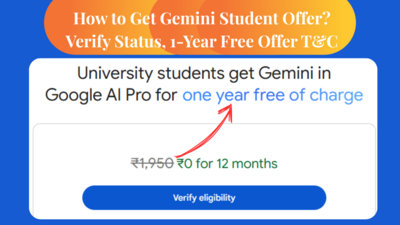
Hearing about the Google Gemini student offer with 1-year Gemini AI Pro free to all students? The offer's last date is 15th September, 2025 so better grab it before it's gone. This amazing offer also includes a 2TB storage for free along with Veo 3 (AI video generator), Google AI Pro features and NotebookLM. So how do you get the Google Gemini Student Offer? Read on to know how to get Google Gemini student offer, benefits, last date & everything else you need to know about this amazing student offer on Google Gemini,
.
Google Gemini Student Offer is providing a free one-year subscription to a Google AI Pro plan to students (aged 18 and over). The offer’s last date is 15th September, 2025. Benefits include free access to Google Gemini 2.5 Pro, full suite of advanced AI tools, 5x higher limits in NotebookLM, Veo 3 along with a 2 TB of cloud storage.
(Find latest deals on Google Gemini & Other AI tools😍)
Also read: Airtel Thanks Perplexity Offer⭐⭐⭐
Following are the important details about Google Gemini offer for students that you must know:
Plan Name |
Google One AI Premium (Gemini Pro for Students) |
Offer Price |
₹0 (100% OFF for 1 year) |
Normal Price |
₹1,950/year (approx, varies by country) |
Offer Validity Period |
Till 15th September, 2025 |
Eligibility Criteria |
Students aged 18+ with valid student verification |
Key Benefits |
Gemini 2.5 Pro, Gemini in Gmail/Docs/Sheets, Veo 3, NotebookLM (5x limits), Gemini Live, 2TB Google Storage |
Use Cases |
Homework help, exam prep, creative writing, research, interviews, AI videos, brainstorming |
Official Offer Link |
.
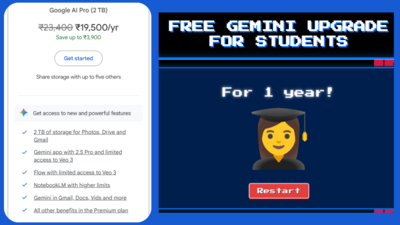
The Google Gemini offer for students has several benefits from generating high-quality text to videos and turning notes into podcasts audio that you can listen anytime, anywhere. Here are the complete benefits of Google Gemini Student Offer:
Full access to Gemini Advanced (2.5 Pro model)
This is Gemini’s most capable version yet. It understands everything from text, images to videos. Plus Gemini 2.5 Pro has got an enhanced reasoning model called Deep Think.
Integrated AI in Google Workspace
Think Gemini helping you draft emails in Gmail, summarize Docs, generate Sheets formulas, etc.
2TB of cloud storage
You get this across Drive, Gmail, and Photos so you can easily store all your notes, research work, etc.
Veo 3 (text-to-video AI tool)
It’s one of the best AI Text to Video makers in 2025. Generate 8-second videos with higher quality and realistic sound.
NotebookLM with 5x higher limits
Feed it PDFs or notes and it’ll summarize, find patterns, or answer questions based on your material.
Gemini Live (voice-based brainstorming)
Speak in real-time with Google Gemini and brainstorm your ideas.
.
Wondering who is eligible for Google Gemini AI Student Offer? Here’s the official eligibility criteria of Google Gemini AI Pro student plan:
Must be 18 years or older
Must be a resident of India
Student status must be verified using a valid school email
Must have a personal Google Account (not enterprise or supervised)
A valid Google Payments account with a working payment method is required
Must redeem the offer via the Google Play Store
Only new Google One users or existing users not on a higher-tier plan are eligible
Not valid for enterprise accounts, Pixel bundle subscribers, Google Fi users, or third-party Google One subscribers
Offer must be redeemed before 15th September 2025
-
Google may request additional info to verify eligibility
To get the free Google Student offer, you first need to prove your student eligibility. Follow the steps below to verify as a student for the Gemini AI Student offer:
Visit this Google Gemini Student Offer link - https://one.google.com/ai-student
Next, click on “Verify Eligibility”
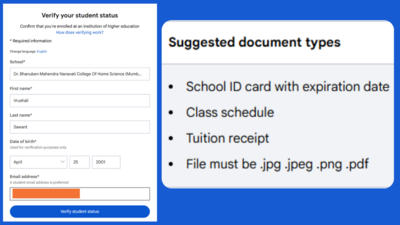
Enter details such as school or institution name, your first name, last name, email address and click on “Verify status”
A student email address is preferred but if you don’t have one, add a normal email address & click to proceed
Next, you’ll have to sign in to your institution website using your email address (student email address, ex: abc@yourschoolname(dot)com)
Don’t worry if you can’t do this step. Open the offer link again in a separate tab.
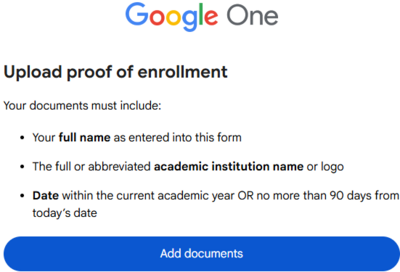
This time, a new window will open asking you to upload documents such as school ID, fee receipt, etc.
Make sure the document has full or abbreviated institution name or logo and an expiration date
Once done, your documents will be reviewed within half an hour.
Once verified as a student, you can avail the Google Gemini Student Offer for free.
Important: Do note the documents you are uploading must have a date that is within the current academic year OR no more than 90 days from today’s date.
Your documents will be reviewed by SheerID, the same trusted partner used by Flipkart in offering their Flipkart Student Club membership.
.
Above, we explained to you the steps to verify as a student for the Google Gemini AI Pro offer. Now, let’s understand step by step how to get the Google Gemini Student Offer once you are verified as a student:
Make sure you are verified as a student for the Google Gemini AI Pro offer
Once done, you’ll receive an email that your verification is successful
You can apply for the Google Gemini Student Offer from the email or visit the offer link
Upon visiting, redeem the offer via Playstore for free
A valid payment method (debit/credit card, UPI, etc.) must be linked. Don’t worry, you won’t be charged right now
If you choose card payment, add your card details like card number, expiry date, and cardholder name
Add your security code (CVV) and enter the OTP received
Wait for a few seconds on the page. Don’t press back
You will get a confirmation window on your screen
Once done, an autopay will be setup
Google says, after the 1-year free period ends, you'll be auto-charged the regular Google One AI plan price unless you cancel in advance.
You can cancel anytime before renewal to avoid charges.
Important: Note if you cancel your subscription during the Offer Period, your membership may remain active until the end of the Offer Period.
.
Here are steps on how to cancel your free Google Gemini student 1-year free trial in Google One.
On your computer or laptop, open the Google One page
On the top right of your screen, you will see a settings icon Click on “Settings”
Here you can either upgrade, downgrade or cancel your Google One plan
Select “cancel membership” if you wish to cancel your free Gemini AI Pro student offer
Click on “Cancel”
You will now successfully cancel your Google Gemini AI Pro Student Plan worth Rs.19,500 (1-year).
.
Offer must be redeemed by 15th September 2025 (last date to claim Google Gemini free offer for students)
Only one free subscription per eligible user
Subscription auto-renews after 12 months at standard pricing unless cancelled in advance
A valid payment method is required, even though the first year is free
If you cancel before the year ends, you’ll still retain access until the 12 months are up (good thing)
Exceeding your 2TB storage after cancellation means you’ll need to either free up space or buy a new plan to continue uploading
Offer is non-transferable, can’t be resold, and can’t be clubbed with other Google One deals
Sources⭐:
Google Blog, Google One AI Student page, Google Student Offer page, DesiDime Deals
FAQs
1. What is the Google Gemini Student Offer 2025?
Google is offering a 1-year free subscription to its Gemini AI Pro plan for students, including 2TB cloud storage, access to Gemini 2.5 Pro, Veo 3 AI video maker, NotebookLM and more.
2. Who is eligible for the Google Gemini AI Student Offer?
Students aged 18+ living in India with a valid student ID or institutional email and a personal Google Account can claim the Gemini student offer for free.
3. What is the last date to claim the free Google Gemini Student Plan?
The Google Gemini student offer must be redeemed by 15th September 2025, after which the free access will no longer be available.
4. How to verify as a student for the Google Gemini offer?
Visit the official Gemini Student Offer link, enter your details, and either sign in via your school email or upload a student ID or fee receipt for verification through SheerID.
5. Do I need a payment method for Google Gemini Student Offer?
Yes, a valid payment method like card or UPI is required to activate the offer, but you won’t be charged during the free 1-year period unless you continue after that.
6. Can I cancel the Google Gemini AI Student Plan before renewal?
Yes, you can cancel anytime during the free year by going to your Google One account settings to avoid being charged after the trial ends.
7. What happens after the free Google Gemini Student Plan ends?
After 12 months, your subscription auto-renews at regular Google One AI Premium pricing unless cancelled in advance, but you keep access for the full year even if cancelled early.
8. What are the top benefits included in the Google Gemini AI Pro Student Plan?
Students get Gemini 2.5 Pro access, AI features in Gmail and Docs, Veo 3 text-to-video tool, 2TB storage, NotebookLM with 5x usage limits, and Gemini Live voice-based chat.
9. Can I use the Google Gemini Student Offer without a student email?
Yes, if you don’t have a student email, you can still verify using a valid student ID or fee receipt showing your institution’s name and date within the current academic year.






![Flipkart Diwali Sale 2026 Date [ Dussehra Offers are Live! ]](https://cdn0.desidime.com/attachments/photos/3554427/large/FlipkartDiwaliSale2026DateOffersExpected.png?1792159253)
Mine stops at the payment session, they say I need to verify payment form and I don’t know how
This one is not working
I am stuck in a loop, it didn't open any page for document verification
I successfully completed the student verification process through SheerID using my college email and I received a confirmation email stating: "We've confirmed your status as a student. You can get your subscription of Google AI Pro for 1 year at no cost now."
However, when I click on "Get Google AI Pro" button in the email, I am redirected to the verification page again. The page shows error: "Verification Limit Exceeded - We're glad you're enthusiastic, but it looks like you've already redeemed or attempted to redeem this offer."
Hai google pay balance tha
Bhai koisi bhi fee receipt daal ke try kar lo maine 2021 ki fee receipt upload ki accept ho gayi. Mil gaya PRO....
I am not student.. can any send me id and fee receipt i will edit it… and get benefit of google ai…for anyone think about privacy just hide personal details
par doosre tareeke hein.
anyway to change email after activating ? or activate it on other person account with ligit student id ?
As for activating it on other person's behalf, you can i guess if you both have logged in from the same personal email account. But then the Sheer ID verification and Play Store subscription setup also must happen from that same account.
Hearing about the Google Gemini student offer with 1-year Gemini AI Pro free to all students? The offer's last date is 15th September, 2025 so better grab it before it's gone. This amazing offer also includes a 2TB storage for free along with Veo 3 (AI video generator), Google AI Pro features and NotebookLM. So how do you get the Google Gemini Student Offer? Read on to know how to get Google Gemini student offer, benefits, last date & everything else you need to know about this amazing student offer on Google Gemini,
.
Google Gemini Student Offer is providing a free one-year subscription to a Google AI Pro plan to students (aged 18 and over). The offer’s last date is 15th September, 2025. Benefits include free access to Google Gemini 2.5 Pro, full suite of advanced AI tools, 5x higher limits in NotebookLM, Veo 3 along with a 2 TB of cloud storage.
Also read: Airtel Thanks Perplexity Offer⭐⭐⭐
Following are the important details about Google Gemini offer for students that you must know:
Plan Name
Google One AI Premium (Gemini Pro for Students)
Offer Price
₹0 (100% OFF for 1 year)
Normal Price
₹1,950/year (approx, varies by country)
Offer Validity Period
Till 15th September, 2025
Eligibility Criteria
Students aged 18+ with valid student verification
Key Benefits
Gemini 2.5 Pro, Gemini in Gmail/Docs/Sheets, Veo 3, NotebookLM (5x limits), Gemini Live, 2TB Google Storage
Use Cases
Homework help, exam prep, creative writing, research, interviews, AI videos, brainstorming
Official Offer Link
Google AI Pro Student Offer
.
The Google Gemini offer for students has several benefits from generating high-quality text to videos and turning notes into podcasts audio that you can listen anytime, anywhere. Here are the complete benefits of Google Gemini Student Offer:
Full access to Gemini Advanced (2.5 Pro model)
This is Gemini’s most capable version yet. It understands everything from text, images to videos. Plus Gemini 2.5 Pro has got an enhanced reasoning model called Deep Think.
Integrated AI in Google Workspace
Think Gemini helping you draft emails in Gmail, summarize Docs, generate Sheets formulas, etc.
2TB of cloud storage
You get this across Drive, Gmail, and Photos so you can easily store all your notes, research work, etc.
Veo 3 (text-to-video AI tool)
It’s one of the best AI Text to Video makers in 2025. Generate 8-second videos with higher quality and realistic sound.
NotebookLM with 5x higher limits
Feed it PDFs or notes and it’ll summarize, find patterns, or answer questions based on your material.
Gemini Live (voice-based brainstorming)
Speak in real-time with Google Gemini and brainstorm your ideas.
.
Wondering who is eligible for Google Gemini AI Student Offer? Here’s the official eligibility criteria of Google Gemini AI Pro student plan:
Must be 18 years or older
Must be a resident of India
Student status must be verified using a valid school email
Must have a personal Google Account (not enterprise or supervised)
A valid Google Payments account with a working payment method is required
Must redeem the offer via the Google Play Store
Only new Google One users or existing users not on a higher-tier plan are eligible
Not valid for enterprise accounts, Pixel bundle subscribers, Google Fi users, or third-party Google One subscribers
Offer must be redeemed before 15th September 2025
Google may request additional info to verify eligibility
To get the free Google Student offer, you first need to prove your student eligibility. Follow the steps below to verify as a student for the Gemini AI Student offer:
Visit this Google Gemini Student Offer link - https://one.google.com/ai-student
Next, click on “Verify Eligibility”
Enter details such as school or institution name, your first name, last name, email address and click on “Verify status”
A student email address is preferred but if you don’t have one, add a normal email address & click to proceed
Next, you’ll have to sign in to your institution website using your email address (student email address, ex: abc@yourschoolname(dot)com)
Don’t worry if you can’t do this step. Open the offer link again in a separate tab.
This time, a new window will open asking you to upload documents such as school ID, fee receipt, etc.
Make sure the document has full or abbreviated institution name or logo and an expiration date
Once done, your documents will be reviewed within half an hour.
Once verified as a student, you can avail the Google Gemini Student Offer for free.
Your documents will be reviewed by SheerID, the same trusted partner used by Flipkart in offering their Flipkart Student Club membership.
.
Above, we explained to you the steps to verify as a student for the Google Gemini AI Pro offer. Now, let’s understand step by step how to get the Google Gemini Student Offer once you are verified as a student:
Make sure you are verified as a student for the Google Gemini AI Pro offer
Once done, you’ll receive an email that your verification is successful
You can apply for the Google Gemini Student Offer from the email or visit the offer link
Upon visiting, redeem the offer via Playstore for free
A valid payment method (debit/credit card, UPI, etc.) must be linked. Don’t worry, you won’t be charged right now
If you choose card payment, add your card details like card number, expiry date, and cardholder name
Add your security code (CVV) and enter the OTP received
Wait for a few seconds on the page. Don’t press back
You will get a confirmation window on your screen
Once done, an autopay will be setup
Google says, after the 1-year free period ends, you'll be auto-charged the regular Google One AI plan price unless you cancel in advance.
You can cancel anytime before renewal to avoid charges.
.
Here are steps on how to cancel your free Google Gemini student 1-year free trial in Google One.
On your computer or laptop, open the Google One page
On the top right of your screen, you will see a settings icon Click on “Settings”
Here you can either upgrade, downgrade or cancel your Google One plan
Select “cancel membership” if you wish to cancel your free Gemini AI Pro student offer
Click on “Cancel”
You will now successfully cancel your Google Gemini AI Pro Student Plan worth Rs.19,500 (1-year).
.
Offer must be redeemed by 15th September 2025 (last date to claim Google Gemini free offer for students)
Only one free subscription per eligible user
Subscription auto-renews after 12 months at standard pricing unless cancelled in advance
A valid payment method is required, even though the first year is free
If you cancel before the year ends, you’ll still retain access until the 12 months are up (good thing)
Exceeding your 2TB storage after cancellation means you’ll need to either free up space or buy a new plan to continue uploading
Offer is non-transferable, can’t be resold, and can’t be clubbed with other Google One deals