











Apple WWDC 2024 Updates for iOS 18, Apple Intelligence, MacOS, & more


 Follow
The Apple Worldwide Developers Conference (WWDC) 2024 went live on June 10th at 10:30 PM in India and the event revealed some exciting line of updates for Apple iPhone, Apple Vision Pro, MacOS and more. Here are some of those updates and highlights from the Apple WWDC 2024 event.

- Create spatial photos from your 2D images!
Apple now allows its users to transform the existing photos from their photo library into spatial photos
- SharePlay for Photos to make Facetime calling with friends & family more interactive
“When you’re on a FaceTime call with friends and family, you can all share and interact with spatial photos, videos, and panoramas at life-size scale when everybody is using Apple Vision Pro. So you can relive memories — wherever you are” said Apple
- A redesigned Photos app
A redesigned Photos app lets you keep a more clutter-free experience to find photos and featured spatial photos. Apple calls the update a generous yet familiar look.
- Trim any video at any epic scale & edit spatial videos with Final Cut Pro software
This next Apple update in WWDC 2024 might especially grab the attention of content creators and video editors. Now, you can easily trim videos in your photo library and do it at any scale. Moreover, you can now import spatial video to your Mac, edit in Final Cut Pro, and view it in Apple Vision Pro.
- Customize your Home View in Apple Vision Pro OS 2 Update
With the new Apple Vision OS 2 update, users can customize their home view to arrange apps the way they want. Simply pinch and jiggle.
View Complete Updates List of Apple Vision OS 2 here
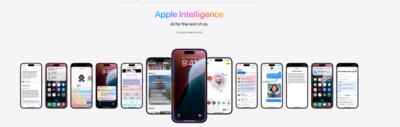
With the new Writing Tools under Apple Intelligence, users would be able to proofread text, rewrite different versions until the tone and wording are just right, and summarize selected text with a tap. The feature would even work on third-party apps
Now users will be able to see priority notifications on top so that you only pay attention to useful notifications, first. Moreover, Apple claims the notifications will be summarized too.
Users can now read some quick email summaries in their mail app. Simply tap to reveal a summary of a long email, as announced in Apple WWDC 2024.
Read more Apple AI Intelligence Updates here
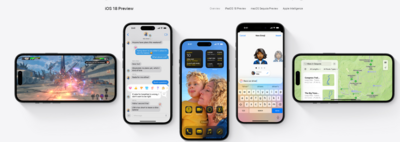
Home Screen customization: Users can arrange apps and widgets in any open space on the Home Screen.
Lock Screen customization: Buttons at the bottom of the Lock Screen are now customizable.
Control Center enhancements: Access more controls quickly from the Control Center.
Photos app redesign: The Photos app has undergone its biggest redesign ever, with photo libraries automatically organized in a new single view and helpful new collections for easy access to favourites.
iMessage text effects: All-new text effects allow users to amplify any letter, word, phrase, or emoji with dynamic, animated appearances.
Satellite communication in Messages: Users can now communicate over satellite in the Messages app, even without a cellular or Wi-Fi connection.
iPhone Mirroring: Full iPhone access and control directly from Mac.
Safari Highlights: Effortless web page information discovery while browsing.
Personalized Spatial Audio for Gaming: Enhanced immersive gaming experiences.
Apple Intelligence: Enables enhanced writing, communication, and quick image creation; supported by all M-series chip Macs.
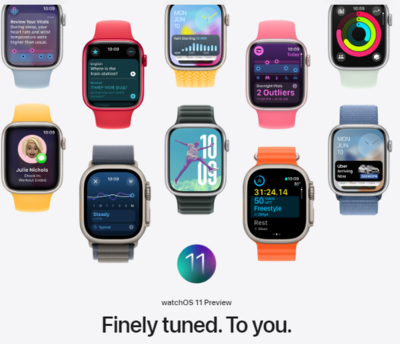
Health and Fitness Insights
New Vitals app surfaces key health metrics
Measure training load for enhanced workouts
More customizable Activity rings
Personalization
Smart Stack and Photos Face offer individualized features
Pregnancy Support
Additional support for pregnant users on Apple Watch and Health app
Connectivity and Convenience
Check-In feature
Translate app
New double-tap gesture capabilities
So this was all about sharing some quick updates on the Apple WWDC 2024 event. Do share with us your thoughts in the comments below which of these features are you looking forward to the most?


![Flipkart Big Billion Days Sale iPhone 16 Expected Price [ 2026 ]](https://cdn0.desidime.com/attachments/photos/3523198/large/FlipkartBigBillionDaysSaleiPhone16Price2026.png?1789120769)




I don't understand why only swiping on one side goes back and not both sides. hope this will be a next gen feature launching in IOS 100. It's like I am put in a pressure cooker when I try to see notifications on my iPhone. it's like I have made a worst decision of my life switching to iPhone.
And launching a basic calculator app in a Event. Gutsy.
I wonder why Apple has been ignoring to improve Siri all this time. Its the worst virtual assistant at the moment. It can only perform basic tasks and has no intelligence unlike Alexa or Google Assistant.
Siri can now do more tasks, making it much more useful than before. This new and improved Siri will be part of Apple’s main apps, and developers can add these capabilities to their apps too.
You can also type your requests to Siri, like setting an alarm without waking someone up. (I think Google Assistant has had this feature for a while.)
There's also some ChatGPT 4.0 integration they are doing
PS: New Siri features will be in beta for iOS 18 in the US this fall; ChatGPT integration is expected later this year.
The Apple Worldwide Developers Conference (WWDC) 2024 went live on June 10th at 10:30 PM in India and the event revealed some exciting line of updates for Apple iPhone, Apple Vision Pro, MacOS and more. Here are some of those updates and highlights from the Apple WWDC 2024 event.
Apple now allows its users to transform the existing photos from their photo library into spatial photos
“When you’re on a FaceTime call with friends and family, you can all share and interact with spatial photos, videos, and panoramas at life-size scale when everybody is using Apple Vision Pro. So you can relive memories — wherever you are” said Apple
A redesigned Photos app lets you keep a more clutter-free experience to find photos and featured spatial photos. Apple calls the update a generous yet familiar look.
This next Apple update in WWDC 2024 might especially grab the attention of content creators and video editors. Now, you can easily trim videos in your photo library and do it at any scale. Moreover, you can now import spatial video to your Mac, edit in Final Cut Pro, and view it in Apple Vision Pro.
With the new Apple Vision OS 2 update, users can customize their home view to arrange apps the way they want. Simply pinch and jiggle.
View Complete Updates List of Apple Vision OS 2 here
With the new Writing Tools under Apple Intelligence, users would be able to proofread text, rewrite different versions until the tone and wording are just right, and summarize selected text with a tap. The feature would even work on third-party apps
Now users will be able to see priority notifications on top so that you only pay attention to useful notifications, first. Moreover, Apple claims the notifications will be summarized too.
Users can now read some quick email summaries in their mail app. Simply tap to reveal a summary of a long email, as announced in Apple WWDC 2024.
Read more Apple AI Intelligence Updates here
Home Screen customization: Users can arrange apps and widgets in any open space on the Home Screen.
Lock Screen customization: Buttons at the bottom of the Lock Screen are now customizable.
Control Center enhancements: Access more controls quickly from the Control Center.
Photos app redesign: The Photos app has undergone its biggest redesign ever, with photo libraries automatically organized in a new single view and helpful new collections for easy access to favourites.
iMessage text effects: All-new text effects allow users to amplify any letter, word, phrase, or emoji with dynamic, animated appearances.
Satellite communication in Messages: Users can now communicate over satellite in the Messages app, even without a cellular or Wi-Fi connection.
iPhone Mirroring: Full iPhone access and control directly from Mac.
Safari Highlights: Effortless web page information discovery while browsing.
Personalized Spatial Audio for Gaming: Enhanced immersive gaming experiences.
Apple Intelligence: Enables enhanced writing, communication, and quick image creation; supported by all M-series chip Macs.
Health and Fitness Insights
New Vitals app surfaces key health metrics
Measure training load for enhanced workouts
More customizable Activity rings
Personalization
Smart Stack and Photos Face offer individualized features
Pregnancy Support
Additional support for pregnant users on Apple Watch and Health app
Connectivity and Convenience
Check-In feature
Translate app
New double-tap gesture capabilities
So this was all about sharing some quick updates on the Apple WWDC 2024 event. Do share with us your thoughts in the comments below which of these features are you looking forward to the most?