












JioPC 1 Month Free Trial, Plans Pricing, Specs, Worth it or Not?


 Follow
Want to get a 1 month free JioPC plan? Wondering if JioPC is worth buying or not? Find answers to these questions & everything else you need to know about the new JioPC launch, plans pricing, JioPC specs and why in reality JioPC actually doesn’t stand up to its hype or blow us away with its performance. All important things you gotta know before you spend your hard earned money buying JioPC plans expecting to use it for office work, study or gaming (If you are dreaming that big😅).
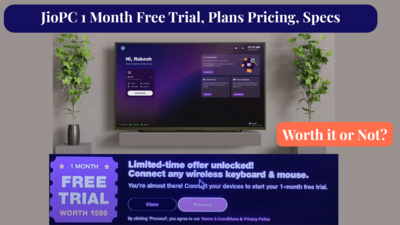
JioPC is a cloud PC service launched by Reliance Jio. It’s a virtual desktop that can be used on your smart TV to easily offer you access to browsing, educational tools, productivity tools, etc. The JioPC app is available on the JioFiber and Jio AirFiber for 1 month free. Others may need to opt for JioPC plans starting from ₹599 per month.
Using keyboard + mouse is mandatory for the jioPC. Right now, Jio is offering 1 month free of JioPC on buying keyboard + mouse combo from Reliance Digital.
JioPC Free on Reliance Digital

Reliance Jio is currently offering an introductory offer on JioPC. JioFiber and Jio AirFiber users are getting invited for 1-month free of the JioPC service. Once the invite is accepted, users will get access to the JioPC app. All you need to do is plug in your keyboard and mouse.
Currently the JioPC 1-month free offer is only invite-based. Jio is rolling out the offer to all users so keep checking the JioPC app to see if you’ve got lucky.
.
Also read: How to get Flipkart Student Club Membership⭐⭐⭐
.
Wondering what are the Jio Cloud PC plans starting from? The cheapest JioPC plan starts from ₹599 and the highest goes up to ₹4599. Important to note is all JioPC plans come with the same specs, 100GB HDD and 8GB RAM.
Following are the JioPC recharge plans:
JioPC ₹599 Plan Features |
Details |
JioPC Plan Price |
₹599 + GST |
Validity |
30 Days |
RAM |
8GB |
Storage (HDD) |
100GB |
JioPC ₹999 Plan Features |
Details |
JioPC Plan Price |
₹999 + GST |
Validity |
60 Days |
RAM |
8GB |
Storage (HDD) |
100GB |
JioPC ₹4599 Plan Features |
Details |
JioPC Plan Price |
₹4599 + GST |
Validity |
455 Days |
RAM |
8GB |
Storage (HDD) |
100GB |
.
Switch on TV and connect it to Jio Setup Box
Open JioPC app
Click on “proceed” on the JioPC Offer page
Connect your keyboard and mouse using either USB or Bluetooth to the Set Top Box.
Enter personal details such as first name, last name, phone number and email address (optional)
Set password
Enter OTP received on your phone
Enter password to log in
You’ve successfully connected to JioPC app
.
Also read: Jio Wifi Router AX6000⭐⭐⭐
.
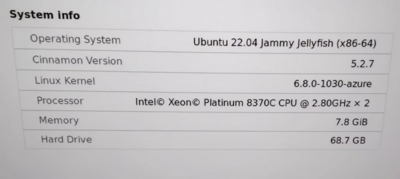
Following are the specs of Jio Cloud Computer:
JioPC System Info (Specifications) | |
Component |
Details |
Operating System |
Ubuntu 22.04 Jammy Jellyfish (x86-64) |
Cinnamon Version |
5.2.7 |
Linux Kernel |
6.8.0-1030-azure |
Processor |
Intel® Xeon® Platinum 8370C CPU @ 2.80GHz × 2 |
Memory |
7.8 GiB (available to use) |
Hard Drive |
68.7 GB (available to use) |
.
Short answer: No.
Long answer: If you're already using JioFiber or AirFiber and just need a temporary desktop setup for basic browsing or Google Docs, the JioPC free trial might be worth trying. But don’t expect a full-blown PC experience.
It runs on Linux, takes a few seconds to respond (lag), and most “apps” are just web shortcuts (like Google Drive, Adobe Express, ChatGPT, etc). Perhaps, the only real & useful default application is Chrome browser.
You get no full app access, and gaming is limited to basic stuff like Sudoku. Since it's running on Linux, there’s no support for Microsoft 365 apps. Though there are still office apps such as Spreadsheets, Word, etc but the interface feels outdated compared to Microsoft.
Even with 8GB RAM and 100GB storage, performance is average. Even if you wanted & tried to, you can’t install many apps (let alone games) since out of the 100GB, only approx 65GB storage is available to use.
With that said, if you need something for browsing mainly, the JioPC does get the job done. Overall, the JioPC is fine for super-light use but not if you're expecting anything close to a regular PC.
You might be better off buying a basic ₹5000 phone instead of spending it on the JioPC annual plan. The Flipkart GOAT Sale is currently live and has pretty good deals on laptops.
Source:
Jio Cloud PC official page
Reliance Digital Keyboard & Mouse Combo Offer with 1-month JioPC (official page).
.
Also read: JioBook Laptop Specs and Worth Buying or Not⭐⭐⭐
FAQs
1. What is JioPC?
JioPC is a new cloud-based computer service launched by Reliance Jio which can transform any smart TV or a monitor into a virtual desktop.
2. What is the JioPC processor?
The JioPC uses a cloud-based virtual machine, which means the actual processor isn’t inside your device. It’s running remotely on a server. But when you connect to JioPC, the system info shows this: Processor: Intel® Xeon® Platinum 8370C CPU @ 2.80GHz × 2
3. What apps do you get with JioPC?
Default apps are actually not apps but shortcuts including Google Driver, Google Presentations, ChatGPT, Facebook, Instagram, Adobe Express
4. What are JioPC plans?
JioPC plans are cloud PC subscriptions starting at ₹599/month, offering 8GB RAM and 100GB storage across all tiers. Higher-priced plans like ₹999 and ₹4599 just extend the validity.
5. Is JioPC free?
JioPC is free for 1 month on an invite basis for JioFiber and Jio AirFiber users. After that, paid plans start at ₹599/month.
6. How to use the Jio Cloud PC on TV?
Connect your Jio Set-Top Box to your TV, plug in a keyboard and mouse, open the JioPC app, and follow the on-screen login setup.







Jio pc 1month
I need 1 month free trail Jio pc
Want to get a 1 month free JioPC plan? Wondering if JioPC is worth buying or not? Find answers to these questions & everything else you need to know about the new JioPC launch, plans pricing, JioPC specs and why in reality JioPC actually doesn’t stand up to its hype or blow us away with its performance. All important things you gotta know before you spend your hard earned money buying JioPC plans expecting to use it for office work, study or gaming (If you are dreaming that big😅).
JioPC is a cloud PC service launched by Reliance Jio. It’s a virtual desktop that can be used on your smart TV to easily offer you access to browsing, educational tools, productivity tools, etc. The JioPC app is available on the JioFiber and Jio AirFiber for 1 month free. Others may need to opt for JioPC plans starting from ₹599 per month.
JioPC Free on Reliance Digital
Reliance Jio is currently offering an introductory offer on JioPC. JioFiber and Jio AirFiber users are getting invited for 1-month free of the JioPC service. Once the invite is accepted, users will get access to the JioPC app. All you need to do is plug in your keyboard and mouse.
.
Also read: How to get Flipkart Student Club Membership⭐⭐⭐
.
Wondering what are the Jio Cloud PC plans starting from? The cheapest JioPC plan starts from ₹599 and the highest goes up to ₹4599. Important to note is all JioPC plans come with the same specs, 100GB HDD and 8GB RAM.
Following are the JioPC recharge plans:
JioPC ₹599 Plan Features
Details
JioPC Plan Price
₹599 + GST
Validity
30 Days
RAM
8GB
Storage (HDD)
100GB
JioPC ₹999 Plan Features
Details
JioPC Plan Price
₹999 + GST
Validity
60 Days
RAM
8GB
Storage (HDD)
100GB
JioPC ₹4599 Plan Features
Details
JioPC Plan Price
₹4599 + GST
Validity
455 Days
RAM
8GB
Storage (HDD)
100GB
.
Switch on TV and connect it to Jio Setup Box
Open JioPC app
Click on “proceed” on the JioPC Offer page
Connect your keyboard and mouse using either USB or Bluetooth to the Set Top Box.
Enter personal details such as first name, last name, phone number and email address (optional)
Set password
Enter OTP received on your phone
Enter password to log in
You’ve successfully connected to JioPC app
.
Also read: Jio Wifi Router AX6000⭐⭐⭐
.
Following are the specs of Jio Cloud Computer:
JioPC System Info (Specifications)
Component
Details
Operating System
Ubuntu 22.04 Jammy Jellyfish (x86-64)
Cinnamon Version
5.2.7
Linux Kernel
6.8.0-1030-azure
Processor
Intel® Xeon® Platinum 8370C CPU @ 2.80GHz × 2
Memory
7.8 GiB (available to use)
Hard Drive
68.7 GB (available to use)
.
Short answer: No.
Long answer: If you're already using JioFiber or AirFiber and just need a temporary desktop setup for basic browsing or Google Docs, the JioPC free trial might be worth trying. But don’t expect a full-blown PC experience.
It runs on Linux, takes a few seconds to respond (lag), and most “apps” are just web shortcuts (like Google Drive, Adobe Express, ChatGPT, etc). Perhaps, the only real & useful default application is Chrome browser.
You get no full app access, and gaming is limited to basic stuff like Sudoku. Since it's running on Linux, there’s no support for Microsoft 365 apps. Though there are still office apps such as Spreadsheets, Word, etc but the interface feels outdated compared to Microsoft.
Even with 8GB RAM and 100GB storage, performance is average. Even if you wanted & tried to, you can’t install many apps (let alone games) since out of the 100GB, only approx 65GB storage is available to use.
With that said, if you need something for browsing mainly, the JioPC does get the job done. Overall, the JioPC is fine for super-light use but not if you're expecting anything close to a regular PC.
You might be better off buying a basic ₹5000 phone instead of spending it on the JioPC annual plan. The Flipkart GOAT Sale is currently live and has pretty good deals on laptops.
.
Also read: JioBook Laptop Specs and Worth Buying or Not⭐⭐⭐