












New JioMart Whatsapp ordering Service: Free Delivery, Top Deals!


 Follow
You can now order groceries and daily essentials on JioMart directly from Whatsapp. Reliance launched the JioMart-Whatsapp shopping experience in its recently held 45th AGM. Earlier also JioMart Whatsapp shopping was available, but was not full-fledged.
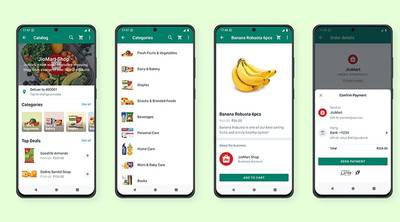
Currently, JioMart allows shopping of limited items (30+) on Whatsapp which it terms as ‘Top Deals’. These are inspired from your previous orders. If you want to see more items then it redirects you to JioMart’s website.
The prices on Whatsapp are similar to that on JioMart’s platform. Moreover, you cannot apply any JioMart Coupons and offers. Thus, it is currently (30/08/22) recommended for those who need fixed & repeated items and quick ordering while not bothering for discounts and cashbacks. However, we expect this to improve ahead.
Talking about the good part, JioMart on Whatsapp has no min order value requirement for free delivery. Also, the ordering process is user-friendly, interactive, and does the job in a flash with proper detailing.

Simply send a “Hi” message to JioMart Whatsapp Number 7977079770 to get started. Your entire shopping journey can be completed on Whatsapp.
Send a Whatsapp “Hi” message to 7977079770.
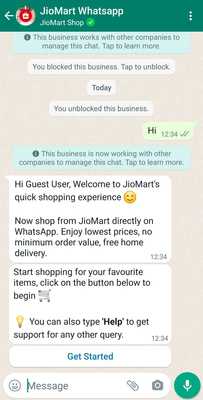
Select ‘Get Started’.
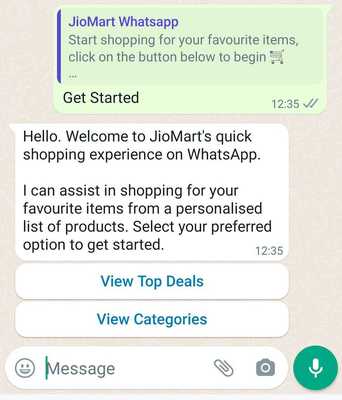
Top Deals will show you 30+ items while ‘View Categories’ will show different category options. We found only ’Deals for Today’ in View Categories which is similar to Top Deals.
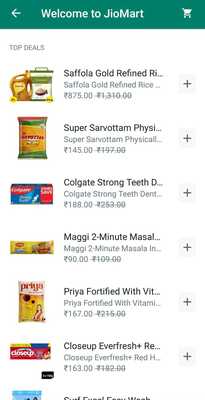
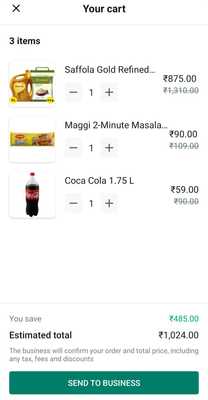
- Select your required items from the list.
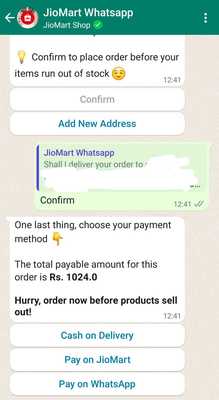
Select payment option from COD, Whatsapp Pay, or ‘Pay on JioMart’. If you wanna save more via JioMart payment offers (Paytm, Mobikwik, Freecharge, PayZapp, Pay with Rewards, etc) then pay on the JioMart platform.
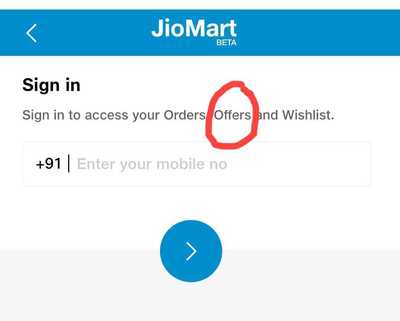
Here we have selected ‘Pay on JioMart’ for applying offers.
That’s it! You can also check order status and track it on Whatsapp. Also, can type “Help” for order related issues.
Did you find the JioMart Whatsapp ordering useful? Will you order from here? Please share your viewpoints. You can also checkout the Best 10-min Grocery Delivery Apps to get your daily essentials shopping sorted.





![Flipkart Big Billion Days Sale iPhone 16 Expected Price [ 2026 ]](https://cdn1.desidime.com/attachments/photos/3523198/large/FlipkartBigBillionDaysSaleiPhone16Price2026.png?1789120769)

I have DONE their BOYCOTT way back a few Months ago .
You can now order groceries and daily essentials on JioMart directly from Whatsapp. Reliance launched the JioMart-Whatsapp shopping experience in its recently held 45th AGM. Earlier also JioMart Whatsapp shopping was available, but was not full-fledged.
Currently, JioMart allows shopping of limited items (30+) on Whatsapp which it terms as ‘Top Deals’. These are inspired from your previous orders. If you want to see more items then it redirects you to JioMart’s website.
The prices on Whatsapp are similar to that on JioMart’s platform. Moreover, you cannot apply any JioMart Coupons and offers. Thus, it is currently (30/08/22) recommended for those who need fixed & repeated items and quick ordering while not bothering for discounts and cashbacks. However, we expect this to improve ahead.
Talking about the good part, JioMart on Whatsapp has no min order value requirement for free delivery. Also, the ordering process is user-friendly, interactive, and does the job in a flash with proper detailing.
Simply send a “Hi” message to JioMart Whatsapp Number 7977079770 to get started. Your entire shopping journey can be completed on Whatsapp.
Send a Whatsapp “Hi” message to 7977079770.
Select ‘Get Started’.
Top Deals will show you 30+ items while ‘View Categories’ will show different category options. We found only ’Deals for Today’ in View Categories which is similar to Top Deals.
Select payment option from COD, Whatsapp Pay, or ‘Pay on JioMart’. If you wanna save more via JioMart payment offers (Paytm, Mobikwik, Freecharge, PayZapp, Pay with Rewards, etc) then pay on the JioMart platform.
Here we have selected ‘Pay on JioMart’ for applying offers.
That’s it! You can also check order status and track it on Whatsapp. Also, can type “Help” for order related issues.
Did you find the JioMart Whatsapp ordering useful? Will you order from here? Please share your viewpoints. You can also checkout the Best 10-min Grocery Delivery Apps to get your daily essentials shopping sorted.