












WhatsApp New Feature Update: You can now stop others from adding you to groups.


 Follow
Don't you hate it when you get a random WhatsApp message that reads, "You were added to this group by someone"? WhatsApp users can easily be added to a group, even by people they don't know or who aren't in their contact list. Fortunately, you don’t have to be troubled with it anymore. WhatsApp’s new feature update includes a function that prevents you from being added to a random group.

If you don't want to be a part of a WhatsApp group that your family or friends keep adding you to, you may simply stop people from adding you. No one can add you to a WhatsApp group without your consent if you enable Group Privacy settings on your smartphone. WhatsApp's new group privacy feature is available on both Android and iOS devices.
However, before you begin, make sure you have the most recent version of WhatsApp installed on your smartphone.
You can use this step-by-step method to enable Group Privacy settings on your smartphone and stop others from adding you to WhatsApp groups.
- Step 1: Open WhatsApp on your Android smartphone.
- Step 2: On the homepage tap the Menu (three-dots icon on the top-right)
- Step 3: From the drop-down, menu tap Settings.
- Step 4: On the new page tap Account and then Privacy.
- Step 5: Scroll down tap Groups and select one of the three given options.
- Step 1: Open WhatsApp on your iPhone and on the bottom bar.
- Step 2: From the given options tap Settings.
- Step 3: Next, tap Account > Privacy > Groups.
- Step 4: Just like Android you need to select one of the three given options.
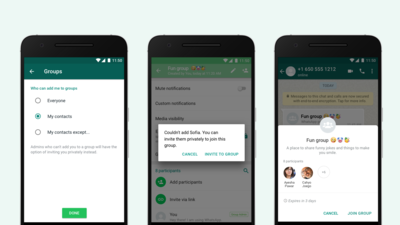
Everyone – By selecting this option anyone can add you to groups
My Contacts option – If you select the My Contacts option, then only your contacts can add you to WhatsApp groups
My Contacts Except – The third option is My Contacts Except, it lets you allow only selected people to add you to WhatsApp groups.
||google_ad||
You can either choose individual contacts or all contacts by pressing the Select All icon in the top-right corner. If a group admin who isn't in your phone's address book wants to add you to a group, they'll get a pop-up saying they can't and be prompted to tap Invite to Group or click Continue, to send a private group invite through an individual message. You'll have three days to accept the invite before it expires.
Earlier versions of WhatsApp, however, allowed anyone to add anyone to a WhatsApp group if they had the other person's phone number. Since the upgrade of the new privacy policy, WhatsApp has rolled out many features benefiting the users.
However, after getting a significant number of user feedback, that random individual began adding others to random WhatsApp groups. WhatsApp has rolled out these group privacy settings for everyone.
Related Reads -
Grofers Launches 10 Minutes Delivery in 10 Cities – Find out more
Paytm partners with HDFC Bank to provide financial solutions to consumers and merchants in India
Asus launches its online store in India with extra savings options





![Flipkart Big Billion Days Sale iPhone 16 Expected Price [ 2026 ]](https://cdn3.desidime.com/attachments/photos/3523198/large/FlipkartBigBillionDaysSaleiPhone16Price2026.png?1789120769)

i need to stop whatsapp call, this feature is still not available in 2021
aisa bakwas shobha nhi deta.
And if it comes to new feature, you should note that earlier it has better option “none”, that is now removed
mujhe laga ab ye old feature ko fir se dubara relaunch kyun kiya ?
Bro i use this feature since 2017
Old feature
GBwhatsapp?
old feature
old feature
This is an old feature which was taken down and now being re launched again
🌞Suprabhatam 🙏
Old Feature getting hotness 🔥and in hot zone😂
Good Morning
This is a very old feature
this was there from a long time
Don't you hate it when you get a random WhatsApp message that reads, "You were added to this group by someone"? WhatsApp users can easily be added to a group, even by people they don't know or who aren't in their contact list. Fortunately, you don’t have to be troubled with it anymore. WhatsApp’s new feature update includes a function that prevents you from being added to a random group.
If you don't want to be a part of a WhatsApp group that your family or friends keep adding you to, you may simply stop people from adding you. No one can add you to a WhatsApp group without your consent if you enable Group Privacy settings on your smartphone. WhatsApp's new group privacy feature is available on both Android and iOS devices.
However, before you begin, make sure you have the most recent version of WhatsApp installed on your smartphone.
You can use this step-by-step method to enable Group Privacy settings on your smartphone and stop others from adding you to WhatsApp groups.
Everyone – By selecting this option anyone can add you to groups
My Contacts option – If you select the My Contacts option, then only your contacts can add you to WhatsApp groups
My Contacts Except – The third option is My Contacts Except, it lets you allow only selected people to add you to WhatsApp groups.
||google_ad||
You can either choose individual contacts or all contacts by pressing the Select All icon in the top-right corner. If a group admin who isn't in your phone's address book wants to add you to a group, they'll get a pop-up saying they can't and be prompted to tap Invite to Group or click Continue, to send a private group invite through an individual message. You'll have three days to accept the invite before it expires.
Earlier versions of WhatsApp, however, allowed anyone to add anyone to a WhatsApp group if they had the other person's phone number. Since the upgrade of the new privacy policy, WhatsApp has rolled out many features benefiting the users.
However, after getting a significant number of user feedback, that random individual began adding others to random WhatsApp groups. WhatsApp has rolled out these group privacy settings for everyone.
Related Reads -
Grofers Launches 10 Minutes Delivery in 10 Cities – Find out more
Paytm partners with HDFC Bank to provide financial solutions to consumers and merchants in India
Asus launches its online store in India with extra savings options