












Apple Music Airtel Prepaid Offer (Free 6 Months of Apple Music)


 Follow
Airtel prepaid users are getting lucky once again after the free Perplexity offer. Users can get Apple Music for free with Airtel Prepaid. The subscription lasts for upto 6 months and users can choose to cancel the auto-renewal anytime. In this article, we’ll be sharing with you what’s the Apple Music Airtel Prepaid offer, how to get Apple Music for free using the Airtel Thanks app and how to cancel the auto-renewal to avoid charges.

Earlier this year, Airtel partnered with Apple to offer Apple TV+ to all Airtel Home Wi-Fi customers at tariffs starting Rs.999. All postpaid customers on plans above Rs.999 got access to Apple TV+ along with 6 months free of Apple Music. Now, Airtel is offering 6 months of free Apple Music to prepaid users as well.
.
Following are the benefits of Apple Music app:
Play over 100 million songs, ad‑free.
Enjoy Spatial Audio with Dolby Atmos.
Apple Music Sing.
Access exclusive interviews and live concerts.
Listen across all your devices, online or off.
.
This brings us to our next question, how to get Apple Music with Airtel Prepaid? Here it is.
Also read: How to Get Perplexity AI free with Airtel
.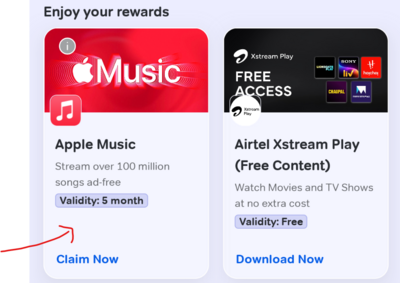
Open Airtel Thanks app & log in with your Airtel prepaid number
Visit the Rewards & Offers section
Click on the “free Apple Music” banner to claim the reward
To activate the Apple Music, just download and login to the Apple Music with the same number
You must add a payment method to your Apple Account to redeem.
After the free period, you’ll be charged ₹119/month unless you cancel.
Also read: How to get Google Gemini Student Offer
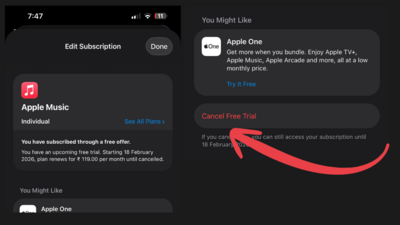
Image credits: Sphinx
As mentioned before, the free Apple Music subscription will be valid upto 6 months and shall auto-renew once the trial is over. So it's better to cancel the subscription beforehand if you don’t wish to continue. Here’s how to do it.
You can cancel the free Apple Music subscription from the Apple Music app itself. Just open your subscription details page and click on the “cancel subscription” button
If you have set an UPI autopay, you can cancel it from the particular UPI app as well. Open the UPI app, open the side menu or navigate to profile details to find “autopay” details and cancel the autopay subscription for Apple Music.
One of our active dimers “mohiitt” also mentioned that any basic Airtel recharge is working to avail this offer including a basic ₹11 one-hour recharge
.
Source: Desidime Forum, Airtel Thanks app





![Flipkart Big Billion Days Sale iPhone 16 Expected Price [ 2026 ]](https://cdn3.desidime.com/attachments/photos/3523198/large/FlipkartBigBillionDaysSaleiPhone16Price2026.png?1789120769)
I think the way Apple cancellation works is that your subscription gets cancelled immediately and not at end of period.
Thanks For Sharing Had Worked flawlessly 🎶
Airtel prepaid users are getting lucky once again after the free Perplexity offer. Users can get Apple Music for free with Airtel Prepaid. The subscription lasts for upto 6 months and users can choose to cancel the auto-renewal anytime. In this article, we’ll be sharing with you what’s the Apple Music Airtel Prepaid offer, how to get Apple Music for free using the Airtel Thanks app and how to cancel the auto-renewal to avoid charges.
Earlier this year, Airtel partnered with Apple to offer Apple TV+ to all Airtel Home Wi-Fi customers at tariffs starting Rs.999. All postpaid customers on plans above Rs.999 got access to Apple TV+ along with 6 months free of Apple Music. Now, Airtel is offering 6 months of free Apple Music to prepaid users as well.
.
Following are the benefits of Apple Music app:
Play over 100 million songs, ad‑free.
Enjoy Spatial Audio with Dolby Atmos.
Apple Music Sing.
Access exclusive interviews and live concerts.
Listen across all your devices, online or off.
.
This brings us to our next question, how to get Apple Music with Airtel Prepaid? Here it is.
Also read: How to Get Perplexity AI free with Airtel
.Open Airtel Thanks app & log in with your Airtel prepaid number
Visit the Rewards & Offers section
Click on the “free Apple Music” banner to claim the reward
To activate the Apple Music, just download and login to the Apple Music with the same number
You must add a payment method to your Apple Account to redeem.
After the free period, you’ll be charged ₹119/month unless you cancel.
Also read: How to get Google Gemini Student Offer
Image credits: Sphinx
As mentioned before, the free Apple Music subscription will be valid upto 6 months and shall auto-renew once the trial is over. So it's better to cancel the subscription beforehand if you don’t wish to continue. Here’s how to do it.
You can cancel the free Apple Music subscription from the Apple Music app itself. Just open your subscription details page and click on the “cancel subscription” button
If you have set an UPI autopay, you can cancel it from the particular UPI app as well. Open the UPI app, open the side menu or navigate to profile details to find “autopay” details and cancel the autopay subscription for Apple Music.
One of our active dimers “mohiitt” also mentioned that any basic Airtel recharge is working to avail this offer including a basic ₹11 one-hour recharge
.
Also read: How to Book Railway Train Tickets at Discount