












How to Get Free Perplexity Pro PayPal Offer? Cancel Autopay & more


 Follow
Perplexity Pro for free is again for up for grabs - this time for all PayPal users. If you missed the Airtel Perplexity offer, this is your one more chance of getting the Perplexity Pro for 100% free. All you need is an active PayPal account with a valid billing method linked. Just visit the Perplexity PayPal offer page and connect your PayPal account to claim 12-months of free Perplexity Pro.
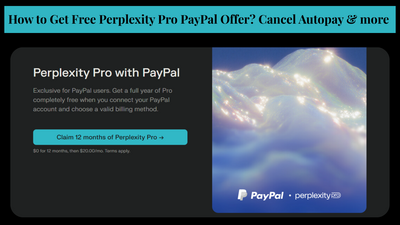
Perplexity has partnered with PayPal and Venmo and is offering 12-months of Perplexity AI for free to all the users. This is a limited-time offer which is valid until December 31st, 2025. Only first-time or new users of Perplexity AI can avail this offer. Users must have an active PayPal or Venmo account and link a valid payment method to get this offer.
Perplexity backed by billions of dollars was founded in San Francisco by Aravind Srinivas, Andy Konwinski, Denis Yarats and Johnny Ho. In G2 Ratings, Perplexity scores a higher level of content accuracy over ChatGPT while ChatGPT takes the lead in creativity. All in all, Perplexity Pro free subscription for 12-months is a no-brainer deal to grab.
.
Open this link - https://www.perplexity.ai/join/p/paypal-subscription
Here, click on the “claim” button
Next, a new window will open with a “connect” button
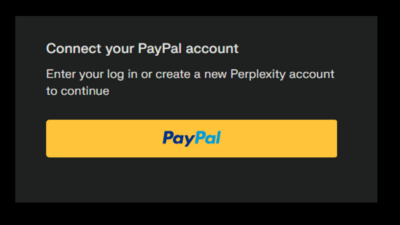
Click on it to connect your PayPal account
Log in with your mobile number and password or create a new PayPal account
If you don’t have a Paypal account, sign up before September 1, 2025 to avoid the 30-day waiting period.
Enter your credit card details
Click on “confirm to pay” and accept the offer
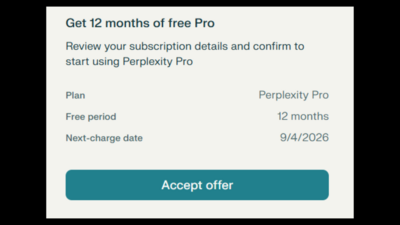
That’s it. You’ve now successfully got 12-months of Perplexity Pro for free with a PayPal account.
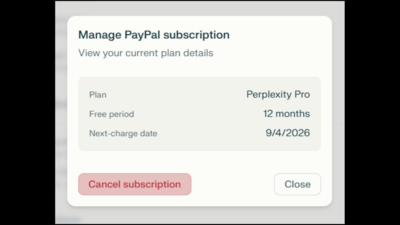
While the Perplexity is 100% free for PayPal users, there’s one small catch. The subscription will auto-renew and will be obviously charged. Thus, it's important for you to cancel your Perplexity free subscription to avoid any unnecessary charges.
Visit Perplexity here - https://www.perplexity.ai/
Here, on the left sidebar menu, click on “account”
Next click on “manage subscription”
Next click on cancel subscription
Confirm and you’ve successfully cancelled your Perplexity Pro subscription from renewing
Also read: Jio Anniversary Offer 2025
Also read: Best AI Video Makers and Editors in India in 2025
On a side note, have you heard of users complaining about differences between the actual paid Perplexity Pro vs the free Perplexity Pro? A lot of users seem to be complaining that Perplexity Pro offered free in the Airtel Thanks app is actually a “Lite” version of the software and doesn’t provide the same quality results. What’s your take? Do let us know in the comments below.
Nevertheless we hope this article helped you know how you can get the Perplexity Pro free subscription using PayPal account.





![Flipkart Big Billion Days Sale iPhone 16 Expected Price [ 2026 ]](https://cdn2.desidime.com/attachments/photos/3523198/large/FlipkartBigBillionDaysSaleiPhone16Price2026.png?1789120769)
Can we connect multiple perplexity accounts to one paypal account ?
Thanks. Worked.
Also Please note that date mentioned in perplexity is mm/dd/yyyy format and not as per indian standard dd/mm/yyyy
Great work , Thanks for detailed post 🙏🏻
Perplexity Pro for free is again for up for grabs - this time for all PayPal users. If you missed the Airtel Perplexity offer, this is your one more chance of getting the Perplexity Pro for 100% free. All you need is an active PayPal account with a valid billing method linked. Just visit the Perplexity PayPal offer page and connect your PayPal account to claim 12-months of free Perplexity Pro.
Perplexity has partnered with PayPal and Venmo and is offering 12-months of Perplexity AI for free to all the users. This is a limited-time offer which is valid until December 31st, 2025. Only first-time or new users of Perplexity AI can avail this offer. Users must have an active PayPal or Venmo account and link a valid payment method to get this offer.
Perplexity backed by billions of dollars was founded in San Francisco by Aravind Srinivas, Andy Konwinski, Denis Yarats and Johnny Ho. In G2 Ratings, Perplexity scores a higher level of content accuracy over ChatGPT while ChatGPT takes the lead in creativity. All in all, Perplexity Pro free subscription for 12-months is a no-brainer deal to grab.
.
Open this link - https://www.perplexity.ai/join/p/paypal-subscription
Here, click on the “claim” button
Next, a new window will open with a “connect” button
Click on it to connect your PayPal account
Log in with your mobile number and password or create a new PayPal account
If you don’t have a Paypal account, sign up before September 1, 2025 to avoid the 30-day waiting period.
Enter your credit card details
Click on “confirm to pay” and accept the offer
That’s it. You’ve now successfully got 12-months of Perplexity Pro for free with a PayPal account.
While the Perplexity is 100% free for PayPal users, there’s one small catch. The subscription will auto-renew and will be obviously charged. Thus, it's important for you to cancel your Perplexity free subscription to avoid any unnecessary charges.
Visit Perplexity here - https://www.perplexity.ai/
Here, on the left sidebar menu, click on “account”
Next click on “manage subscription”
Next click on cancel subscription
Confirm and you’ve successfully cancelled your Perplexity Pro subscription from renewing
Also read: Jio Anniversary Offer 2025
Source: Paypal Press Release, DesiDime Deals
Also read: Best AI Video Makers and Editors in India in 2025
Nevertheless we hope this article helped you know how you can get the Perplexity Pro free subscription using PayPal account.